
Build Your Custom CRM — Inside the Dialer
Enable business teams to design data models, automate workflows and integrate systems — all without leaving the communications platform. The result: faster processes, clearer context, and measurable outcomes.
Your IVR, Reimagined for Modern Conversations
Design adaptive call flows that feel natural, intelligent, and fully aligned with your business processes.
Enterprise Outcomes
Implement CRM that reduces time-to-value, increases agent productivity and unlocks cross-functional visibility.
How a Smart IVR Flow Works
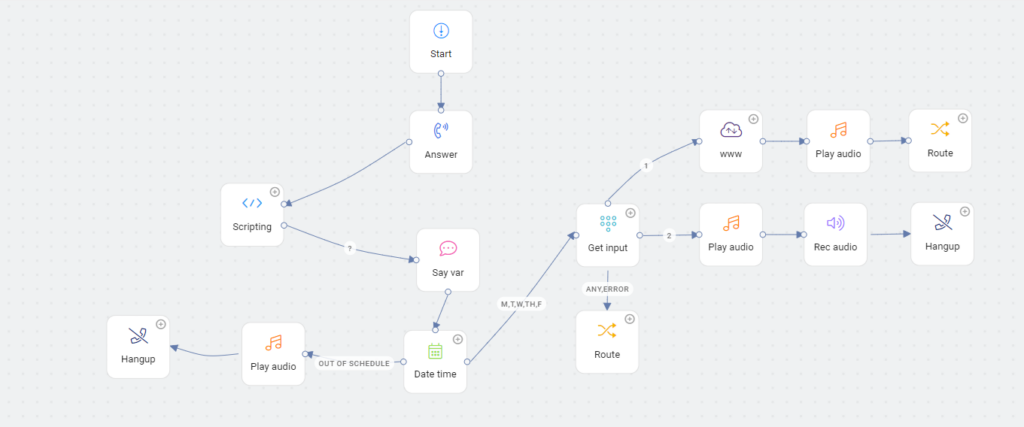
From the moment a call comes in, our IVR system intelligently guides, routes, and logs every interaction — ensuring smooth, automated customer experiences.
Incoming Call Detected
A customer call lands on your business number and gets automatically picked up by the IVR system.
IVR Greeting & Menu Prompt
The IVR greets the caller with a personalized message and offers menu options (e.g., Press 1 for Sales, 2 for Support).
User Input & Identification
The caller’s input or speech is recognized to identify intent, caller type, or specific request using DTMF or AI speech analysis.
Intelligent Call Routing
Based on the selection or intent, the call is routed to the correct department, live agent, or AI voice assistant.
CRM Sync & Logging
Call details, duration, and outcomes are logged automatically into your CRM — providing full visibility and analytics.
Know More About Chatbot
Ready to Design Your IVR Flow?
Get a custom IVR flow that aligns with your business needs and streamlines your customer experience.
